
Oct 2026
/
5 min read
My Family Tree vs Ancestry: A Private iPhone & iPad Alternative
Compare My Family Tree and Ancestry: free plans, privacy, iCloud backup, collaboration, lifetime Premium, historical records, and import options.
Looking for an Ancestry alternative for iPhone or iPad? My Family Tree is a good fit if you want to organize relatives, relationships, and memories with family data stored on your device by default. Ancestry is better suited to historical-record research and DNA discovery. The right choice depends on what you want to do with your family history.
We make My Family Tree. This is our product comparison, not an independent review. Product information and the linked official sources were checked on October 10, 2026.
A personal home for your family’s story
My Family Tree lets you build a visual tree, connect generations, and save profiles, notes, and memories. It works on iPhone and iPad, so you can add a detail when it comes to mind or spend time exploring your tree on a larger screen.
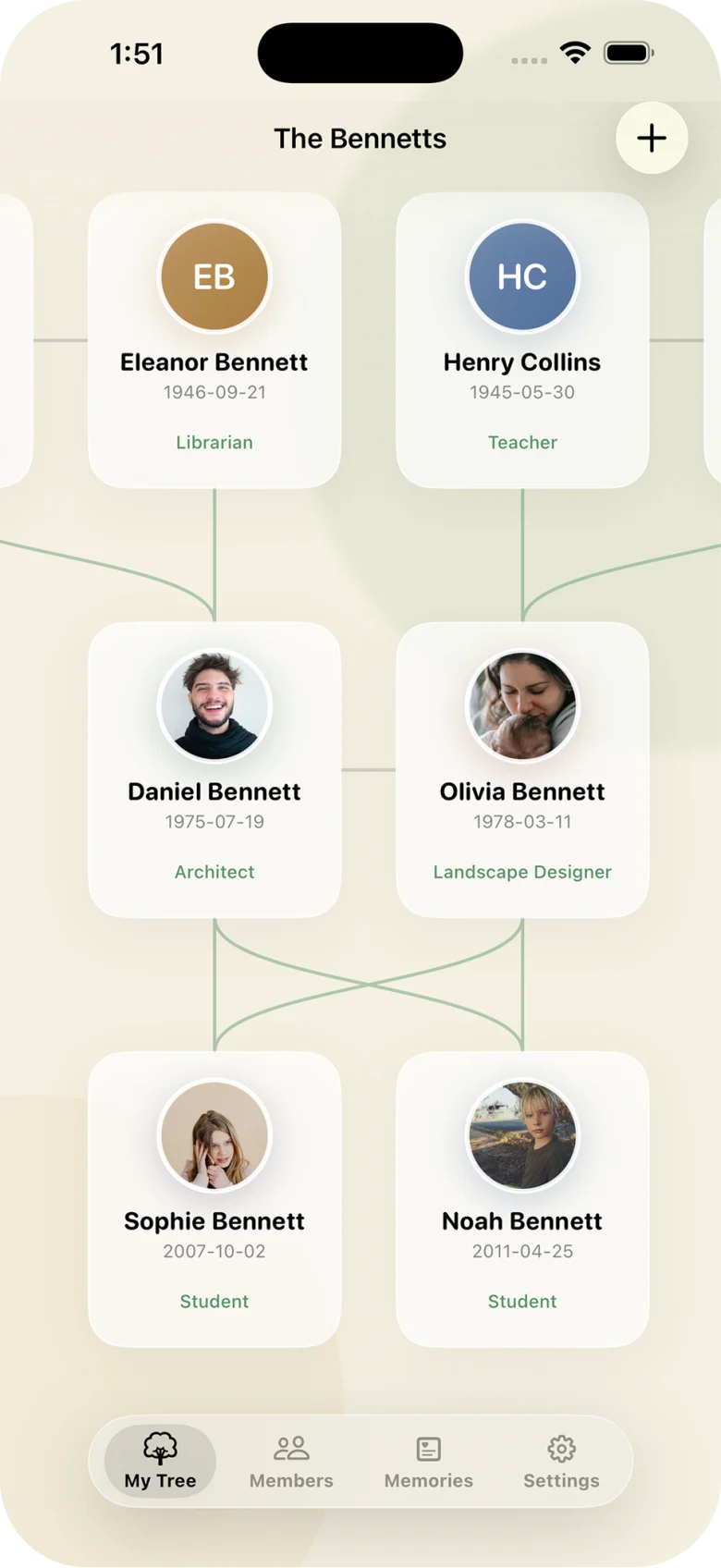
Start with the people you know: parents, grandparents, siblings, partners, and children. Add the stories you want to preserve alongside the relationships. You can manage multiple trees as your family history grows.
Explore My Family Tree’s features or download it free on the App Store.
Free plans and Premium: what you actually pay for
Both apps let you start a family tree for free. My Family Tree’s free plan has a limit on the number of family members you can add. Premium includes unlimited members, iCloud sync and backup, invited collaboration, and data import/export.
My Family Tree offers monthly Premium or a lifetime purchase. If you prefer a one-time payment, lifetime Premium gives you that option. Check the app for current prices in your region.
Ancestry also provides free tree building. Most of its historical-record collections require a paid membership, although some collections are free. See Ancestry’s free registered guest account details for the limits. It would be inaccurate to say you must pay just to create an Ancestry tree.
Privacy: local storage and online trees
My Family Tree stores your family data on your device by default. ANCREATIVE does not collect your tree or keep a copy on its servers. Optional Premium iCloud features use your own iCloud account, and you can invite collaborators when you want relatives to contribute. Read our privacy policy for how the app handles data.
Ancestry offers both public and private online trees, with controls for invited access. A private Ancestry tree remains hosted through its online service. Its family tree privacy guide explains the available settings.
The practical difference is where you choose to keep your family information and how you want to share it. My Family Tree is designed around local storage by default, with optional iCloud features and invited collaboration.
Building a tree together
With My Family Tree Premium, you can invite relatives to collaborate. One person might remember a birthday while another knows the story behind a family photo. iCloud sync and backup help keep your tree available across your compatible Apple devices when enabled.
Ancestry also supports sharing trees and managing access. Its mobile app guide describes the tree settings and sharing tools. Collaboration is a feature to compare in both products, rather than a capability unique to My Family Tree.
When Ancestry is the better fit
Ancestry combines tree building with historical-record research and AncestryDNA services. If your goal is to find documentary evidence, discover ancestors through record collections, or explore DNA matches, those are capabilities My Family Tree does not provide. Access depends on the Ancestry product and plan; see its research and tree-building overview.
My Family Tree organizes the people, relationships, and stories you add. It does not offer a historical-record search service, DNA testing, or DNA matching.
You can use the two alongside each other: research with Ancestry, then manually add the family details you want to keep in My Family Tree. The apps do not automatically sync. Check any record or media usage rights before copying material.
Can you import an existing Ancestry tree?
Check the file format before planning a move. Ancestry exports trees as GEDCOM files, while My Family Tree’s Premium import uses CSV. Direct Ancestry/GEDCOM import is not offered. Renaming a GEDCOM file does not convert it to CSV.
- Keep your original tree export and media.
- Check My Family Tree’s required CSV columns and supported data.
- Verify a small sample before importing more.
- Check names, relationships, dates, and photos; they may need separate handling.
Read Ancestry’s export documentation, or contact our support to ask about compatibility. You can also start a fresh tree with the relatives and memories you most want to preserve.
Which app should you choose?
Choose My Family Tree if you want a personal family record on iPhone and iPad, local storage by default, and optional Premium with a lifetime purchase option. Start free to see whether its approach works for you before upgrading.
Choose Ancestry if historical records and DNA research are central to your plans. Its free tree tools may also meet your needs, even without a membership.
Common questions
Can I build a family tree without a subscription? Yes. My Family Tree’s free plan works within its family member limit, and lifetime Premium is available as a one-time purchase. Ancestry also allows free tree building.
Does My Family Tree work on iPad? Yes. It is available for iPhone and iPad. Premium includes optional iCloud sync and backup across compatible Apple devices.
Can relatives help build the same tree? Yes. My Family Tree Premium includes invited collaboration. Ancestry also offers tree-sharing tools.
Will My Family Tree find ancestors for me? No. It is for organizing family information you add, rather than searching historical records or DNA matches.
Start with the people you know
Your tree does not need to be complete to be worth keeping. Add a relative, save a memory, and grow it over time. Download My Family Tree for iPhone and iPad, or explore the free and Premium plans.
Features and plans can change. Review the linked official sources and current in-app pricing before choosing. Ancestry is a trademark of its respective owner. ANCREATIVE is not affiliated with or endorsed by Ancestry.