
Nov 2026
/
3 min read
An FL Studio Mobile Alternative for Quick Melody Sketches
Sketch melodies and beats on iPhone or iPad with Loop - Melody Maker. Start free, compare it with FL Studio Mobile, and export WAV to FL Studio.
Looking for an FL Studio Mobile alternative for iPhone or iPad? We built Loop - Melody Maker for the moment a tune gets stuck in your head and you want to write it down before it goes. Tap the notes into a grid, hear them repeat, and save the idea. If the loop turns into a song, export it as WAV audio and bring it into FL Studio on your computer. Explore Loop - Melody Maker.
Tap out a melody as soon as it comes to you
Say a four-note hook comes to you on the bus. Open Loop on your iPhone, tap those notes into the grid, and press play. While it repeats, shift a note half a beat later and tap in a kick, snare, or hi-hat. Add another page when you hear a second phrase, then save the sketch and get on with your day. It works offline, and the iPad version gives you a 24 × 24 grid with more room to work.
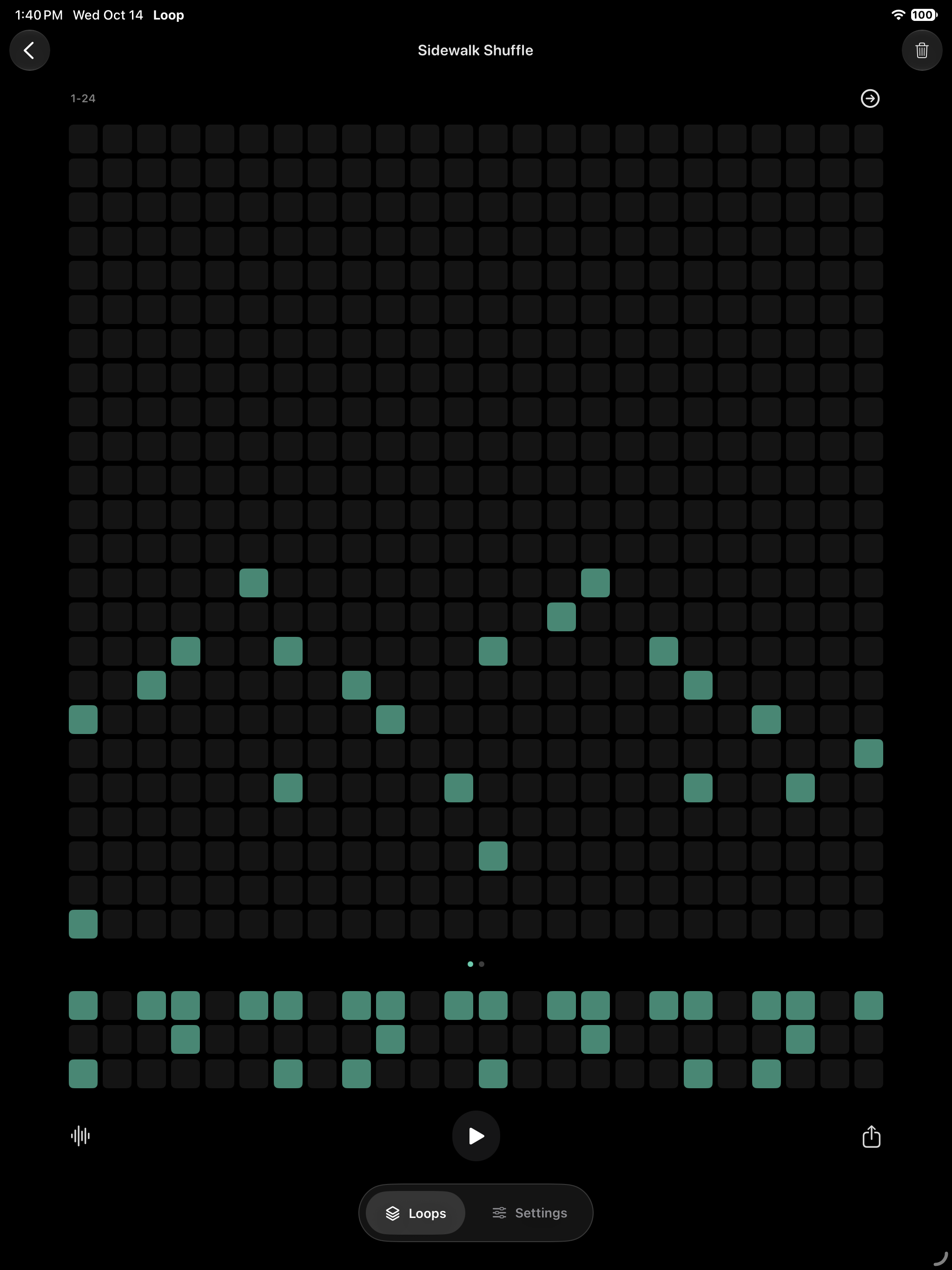
Loop Premium includes the full built-in sound toolkit. Both Premium plans give you five types of synthesis, built-in drums, and effects like delay and reverb. You can change the scale and tempo, too. Hear how a simple melody and drum pattern can carry a groove. Play the jazz-inspired After Hours sample.
Loop vs. FL Studio Mobile
| What you need | Loop - Melody Maker | FL Studio Mobile |
|---|---|---|
| Capture a melody | Tap notes and drums into a grid and hear the pattern repeat | Use the piano roll or record a performance into a track |
| Shape the idea | Multiple grid pages, synth controls, and effects | Multitrack arrangement, recording, automation, and mixing |
| Bring the idea into FL Studio | Export a WAV with Premium | Export audio, MIDI, or an FL Studio project |
| Try it on iPhone or iPad | Free download with five samples and one personal saved loop | US$7.49 upfront during the Black Friday sale through December 3 |
| Sounds and packs | Full built-in sounds and effects included with Premium | Built-in sounds included. Listed paid packs cost US$0.99–US$3.99 each |
| Upgrade | US$1.99/month or US$14.99 lifetime for unlimited saved loops, the full sound toolkit, and WAV export | The upfront purchase includes the production tools |
Loop is a better fit when you mainly want to catch melodies on your phone and see which ones are worth developing. You can make and save a sketch without paying upfront. FL Studio Mobile is a fit when you want to record, arrange, and mix the full song on your phone or tablet.
What Loop Premium unlocks
Get the full set of sounds and controls with a one-time US$14.99 lifetime purchase or a US$1.99 monthly subscription. Both plans include the same features on iPhone and iPad.
- Synths and waveforms. Choose FM, AM, wavetable, subtractive, or membrane synthesis. Where the synth supports it, choose a sine, triangle, square, or sawtooth waveform. Adjust brightness, FM or AM intensity and harmonic ratio, or the blend between waves in the wavetable synth.
- Scales, octave, and tempo. Set the grid to major, minor, Dorian, pentatonic, or blues. Choose an octave and adjust the tempo to suit your idea.
- Envelope and effects. Shape each note with attack, decay, sustain, and release. Add reverb, tremolo, delay, or distortion. Adjust the delay time and use the synth’s built-in vibrato.
- Drums, samples, and export. Sequence kick, snare, and hi-hat sounds, edit the included sample loops, and save as many of your own loops as you like. Export your finished idea as WAV to use in another app or turn it into a ringtone.
How to export a Loop melody into FL Studio
- Open your saved loop in Loop and export it as WAV with Premium.
- Save or share the WAV to a location you can access from your Mac or PC.
- In FL Studio, drag the WAV into the Playlist as an Audio Clip in a supported edition, or load it into a Sampler channel. Set the project to the tempo you used in Loop if you want to build around the original timing. Image-Line’s audio import guide
The WAV carries the rendered sound of your loop. Keep the original Loop project to revisit individual notes, drum steps, or synth settings.
Try it with the next melody you hear
Start with the free version and save one idea of your own. If you like the workflow and want unlimited sketches or WAV export, you can upgrade later. Download Loop - Melody Maker for iPhone and iPad.